Introduzione

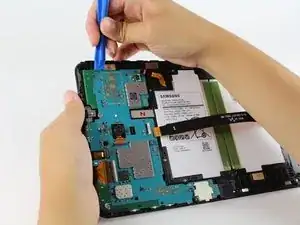
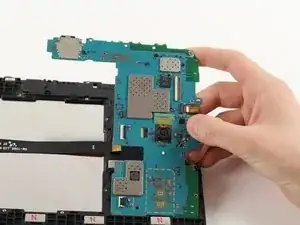
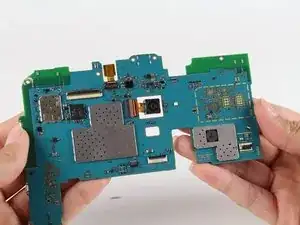
Se hai una scheda madre danneggiata, rotta o corrotta, questa guida ti aiuterà a sostituirla.

  1. GZ2Pki1FpHlvCO3S
    GZ2Pki1FpHlvCO3S
    5VJRorbfRR23MCuC
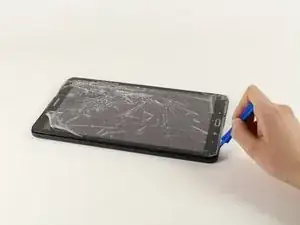
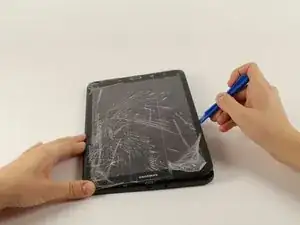
    • Appoggia il dispositivo con lo schermo rivolto verso l'alto.

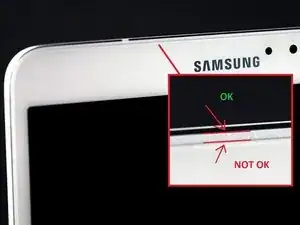
    • Inizia vicino ad uno dei bordi curvi del dispositivo(usa la seconda immagine come esempio).

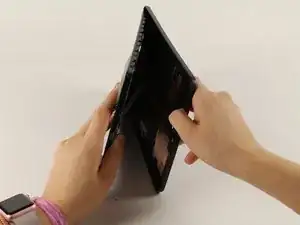
    • Infila uno strumento di apertura in plastica tra la copertura posteriore e quella anteriore.

    • Se uno strumento di apertura in plastica non funziona, prova con uno spudger in metallo, ma potresti danneggiare la plastica sul dispositivo.

    • Ricordati di rimuovere la scheda micro SD (se inserita) prima di iniziare.

    AWESOME!! I was trying to open it from the “NOT OK” place and you saved me to broken the screen… thanks!!

    David Leiva -

    No problem, enjoy.

    Roger L. Ortiz -

    Felt it was easier for me to do it from the middles out.

    Tanin Garcia -

    @rogerlortiz You two seem to be miscommunicating. The author points out the location between the digitizer and frame in which to place a tool. While @Tanin Garcia, whom no longer seems to be member, was pointing out where along the edge from corner to corner it was best to start the separating process.

    B. A. Computer Services -

    Important: the display is sourrounded with a plastic frame. You need to get beween this frame an the backcover (not directly at glass edge as I tried it first and almost broke the glass). Get a closeup picture of it to clarify.

    Oliver Dawid -

    wer lesen kann, ist klar im Vorteil - ich hab die SD-Karte drin gelassen. Hat aber funktioniert…

    Thomas Wolter -

    Don’t use a very small flathead screwdriver as a spudger. Just shattered the screen :(

    nikvoss -

    Yes, shattered the screen. To the garbage, it goes. A little knowledge is a dangerous thing. This a repair better suited for a professional repair! Thanks for helping me make the decision to get another one!

    vancega -

  2. FEt6AIIjfR5mPXQH
    FEt6AIIjfR5mPXQH
    SOQODCRyQZlwVvj1
    • Una volta che lo strumento di apertura in plastica è stato infilato, usalo per fare leva lungo i bordi del dispositivo per separare la copertura posteriore.

    • Rimuovi la copertura posteriore dal dispositivo.

    • La copertura posteriore emetterà qualche crepitio mentre viene rimossa dal dispositivo.

  3. aKoSIwKnMC1lAyYP
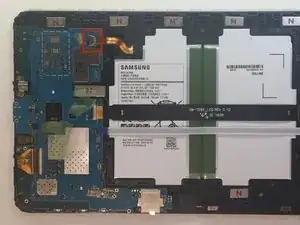
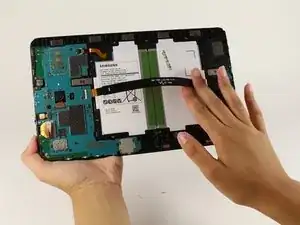
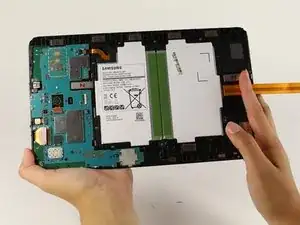
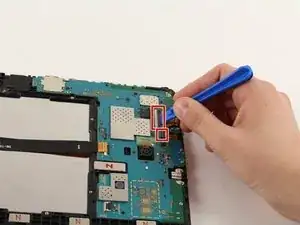
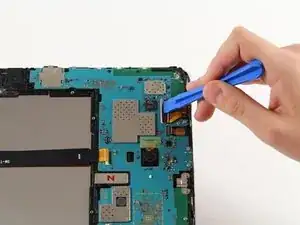
    • Rimuovi la protezione adesiva e ruota verso l'alto l'aletta di bloccaggio sul connettore ZIF della batteria.

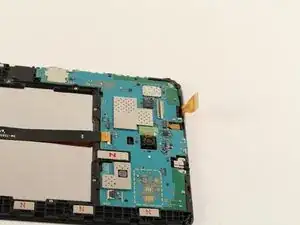
    • Sfila il cavo a nastro arancio della batteria dalla sua presa.

    BEWARE!!! later on Samsung tablets the tab holding the main cable (marked “MAIN”) breaks as soon as you attempt to lift the tab to remove the ribbon! I reckon Samsung designed this breakabloe tab to not only avoid the warranty, but the render the tablet useless!

    graham chapman -

    Happened to me also, in order to replace that broken tab, do you think it will be necessary to replace the motherboard? I highly doubt we can find the parts to fix (replace) the flip-tab.

    jeanuhlik -

    I also had this problem, the connector broke, even if i was very careful, i still can use the tablet, i pushed the “main” cable in place and used a little bit of hotmelt glue to hold it in place.

    Yannick -

    I tried using aluminum foil to make the connection but it didn’t help at all, how did you attach it with the glue gun???

    jeanuhlik -

    LOOK what I found!!! its the replacement for the connector we broke!!!https://www.parts4repair.com/samsung-gal...

    jeanuhlik -

    i just wonder how u gonna solder this tiny thingie

    Mike Muley -

    I wish I had read this thread before I removed the cable and broke the connector. Unfortunately I have not been able to reattach the cable and my tablet is dead.

    If there is no way to remove this cable, why is this fix even posted here? I find this exceptionally uncool!

    Derek N. Eder -

    Whoever broke the connector was trying to open it the wrong way. I have oil spilled in mine after I replaced my screen and digitizer together if you only replace the screen it is more difficult. I say changing both together is simpler. And I will share a pic either way I just might mess up MY connector. To be continued

    909 -

  4. 1OplFVIHHB6iE5cO
    1OplFVIHHB6iE5cO
    rwOOcqLwpiM2JFMo
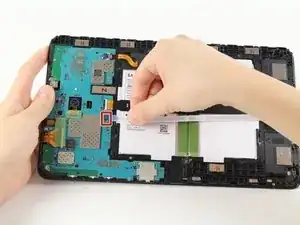
    • Rimuovi la protezione adesiva, solleva l'aletta di bloccaggio e sfila il cavo a nastro bianco dello speaker dalla sua presa.

  5. 1uZdAEXRWTnJfwkc
    1uZdAEXRWTnJfwkc
    QNlFwvR4JP4LMckg
    vBRRQDtXcrOZQgDV
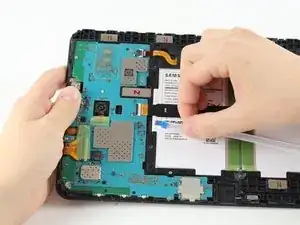
    • Solleva l'aletta di bloccaggio e sfila il cavo a nastro nero dello schermo.

    It's possible to replace only the lcd cable connector? Ist das möglich nur das Flachbandkabel zu tauschen?

    Lima -

  6. O4bvieDFdNTtVvWS
    O4bvieDFdNTtVvWS
    pSQTogUPIWyaBqa3
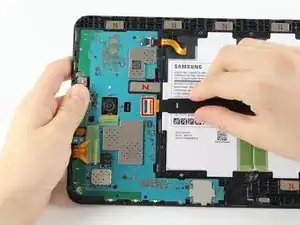
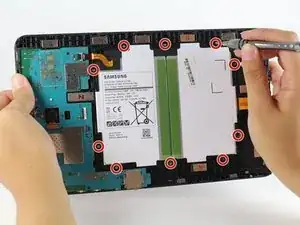
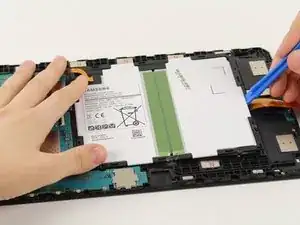
    • Usa un cacciavite a croce Phillips #000 per svitare le dieci viti da 4 mm attorno alla batteria.

    • Infila uno strumento di apertura in plastica sotto il bordo inferiore della batteria vicino allo speaker e sollevala.

    • Il grande rettangolo bianco e nero è l'intera batteria. Stai attento a non forarla.

  7. fPglWd16CqrfTnPk
    fPglWd16CqrfTnPk
    Ixaqq2Rd5qpRFqsy
    xE4TWX2YDWswXU6Z
    • Ruota verso l'alto le due alette di bloccaggio sui connettori ZIF con uno strumento di apertura in plastica.

    • Sfila i cavi a nastro arancio dalle loro prese.

    • Rimuovi la fotocamera anteriore.

    This step omits the disconnection of the battery from the motherboard , which is shown disconnected in this picture but was connected in the previous step

    Christopher Ford -

    Thanks for bringing this to our attention. We added the relevant battery disconnection steps—hope this helps!

    Kristen Gismondi -

    If the model you are working on is the T585 you will need to carefully pry up the blue antennae cable and disconnect the sim card slot from the motherboard.

    Brendon Gould -

  8. ZeXlPco1GFY2fcas
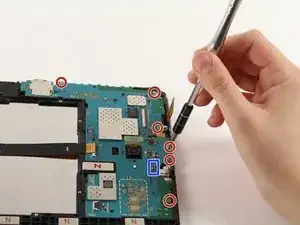
    • Scollega la presa jack dalla scheda madre.

    • Usa un cacciavite a croce Phillips #000 per svitare le sei viti da 4 mm.

    die ganze Platine musste ich gar nicht ausbauen. Ich konnte die Kopfhörerbuchse vorsichtig mit einem kleinen flachen Schrubendreher lösen.

    Thomas Wolter -

  9. sR1EQqLISYUKoWBI
    sR1EQqLISYUKoWBI
    ZWuKRRPlJL6FGDYS
    • Infila lo strumento di apertura in plastica sotto la scheda madre, sollevala e rimuovila dal tablet.

    • Stai attento a non far impigliare i connettori.

    • Rimuovi il supporto in metallo che stava sotto la porta di carica e mettila da parte.

    Replacing the broken screen, I stupidly unhooked the LCD with a metal screwdriver. It makes the sound of coming on but no picture. Is that the motherboard?

    MARGARET -

    I replaced screen once before and had no problem except using a screwdriver this time.

    MARGARET -

    I have tab a charging and show on screen but not starting at all motherboard water damage I clean all there any way make it start by motherboard with out power button

    waleed nawzad -

    TIP: Before next step (or sooner), cover cracked/broken glass with transparent tape to avoid (I didn't) or minimize small shards of glass falling into work area and onto your clothing.

    Bruce Grant -

Conclusione

Per rimontare il dispositivo, segui le istruzioni in ordine inverso.

Isabella Li

Membro da: 02/10/17

2358 Reputazione

Un commento

habe es geschafft zum zerlegen... leider ist nur der verschluss vom LCD hops gegangen. Ohne diesen geht wohl nix. Kein Bild.

Mike Muley -